When the original iPad came out (circa 2010), I was still in the midst of my Apple fanboy era, so naturally I hopped onboard, buying the 64GB version for $699. I loved the idea of tablets, but if I’m being honest, at the time I ended up treating it like more of a novelty than an actual useful tool (or toy) – and it didn’t get a lot of use.
I bought the 2nd gen iPad too, paying again too much money considering the amount of actual use I got out of it – but I did figure out what my actual use-case was for tablets – mobile media consumption – particularly for travel.
In those days, it was quite a hassle getting media recorded, and moved onto the tablet. Ripping DVDs and later Blu-ray discs was time consuming, and compression wasn’t all that great, or fast. File sizes were a limiting factor for how much ‘library’ you could tote around. Bandwidth, especially of the wireless variety, wasn’t as pervasive, nor as capable.
I’m going to spare you the history lesson, and leave it at: Things have evolved.
Until just a couple years ago, I’d kind of turned my back on tablets. I just couldn’t justify the costs when weighed against my limited usage.
A couple of things changed all of that.
Leaving Apple’s Walled Garden
I’d grown frustrated with Apple, and in the end, they chased away a good customer.
I had three main complaints:
- Their DRM schemes were a headache for all of the media I’d purchased through iTunes, both audio and video.
- The upgrade cycle for their phones was bugging me. They always seemed to wait an extra cycle before the feature they’d been touting actually showed up on a device.
- I was growing weary of the price premium I was paying not just on their handheld devices, but also on the computer front – have you ever looked at what they charged for memory upgrade when ordering a new laptop? Criminal.
I was quietly tolerating all of that. The straw that broke the camel’s back, however, was about ten years ago when after many rumors, Apple finally admitted they’d been sneakily crippling previous models of their phones, both in terms of performance, and hobbled battery life.
I switched to Samsung and Android during my next phone upgrade cycle, and haven’t looked back.
Simultaneously, I’d allowed Windows PCs to creep back into my life. This was mostly driven by my kids – both of which wanted to get into gaming. Additionally, COVID made staying home a thing, so pouring money into upgraded workspaces and entertainment solutions made all of the sense in the world.
I ended up building both of them custom PCs, which then expanded into full blown multi-monitor Battlestations. and then they were having such a good time, I decided to build one for myself, and join them.
When it came time to start doing laptop upgrades and replacements, Windows laptops just made the most sense, both to fit the changes in the rest of my environment, and in getting a handle on the price/performance equation.
All of which brings me to:
Affordable Android Tablets
Taking a flyer on a sub-$300 device is not much of a gamble – especially with Amazon’s return policy.
After getting into Lenovo’s ecosystem through the laptop door, naturally, they’d periodically send me advertising – especially when they were running a sale. Do you know why companies spend so much on advertising? Because it works!
Lenovo Tab P11 Plus
In May ’22, in one of those ads, Lenovo had their Tab P11 Plus on sale for $199. I’m not shamed to admit it: I don’t put a lot of thought into a $200 tech purchase. I’m a techie. Always have been, both personally and professionally.
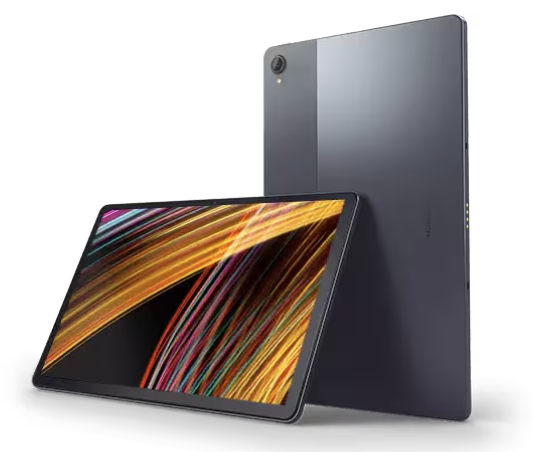
This was not a powerhouse device, but for my uses (media consumption while travelling), it was amazing. Inexpensive, thin, relatively light, with a very nice 11 inch screen (nice in both size and resolution).
After the addition of an SD Card, it could hold a lot of media. Between Plex and the streaming services, I was perfectly happy. It was great for travel, and at that price, even if I only traveled with it 3 or 4 times per year, I felt is was worthwhile – and I did end up using it at home too.
I ended up using it as an e-reader a lot of the time. It was also very convenient for light web browsing, and checking / deleting email. It’s terrible for social media, but all tablets are. I blame the social media platforms, who treat tablets like large screened phones – their mobile apps really kind of suck.
And if it requires typing of anything beyond entering search terms into Google or Amazon, my laptop is still the preferred choice, and almost always at hand.
The P11 Plus proved to me that an affordable tablet was actually useful for me in my life, both at home and on the road.
Lenovo Tab Plus
In May ’25, the advertising got me again. They ran a sale on the Lenovo Tab Plus with upgraded memory and storage for $219.
Unlike myself, my wife plays games on her phone, and the squinting was becoming a bit of a problem. I bought one of these for her (we refer to it as her ‘Giant Gameboy’). When it arrived, I was so jealous that I ordered another one for myself.
(The P11+ lives – after a factory reset, it went to my son – it’s now his mobile/travel media consumption device.)
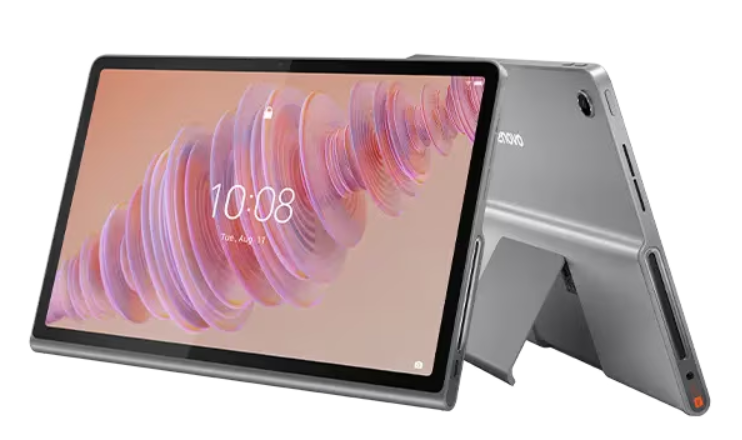
I wrote about this device in my original ‘Perfecting Travel‘ post:
It’s inexpensive, has a large screen, a fast enough processor, and an SD card slot for storage expansion. There’s a sturdy kickstand built in, and that ‘bump out’ on the back is an 8-speaker JBL sound system (25W). There isn’t a better sounding tablet. It also doubles as a Bluetooth speaker for other devices.
I stand by all of that, but there are two drawbacks:
- It’s heavy, especially when having to hold it for use as an e-reader. It’s certainly do-able, but if you really emerge yourself in a multi-hour reading binge, you will feel it.
- It’s a little thicc (with 2 C’s) as a result of that bump-out area for the enhanced speakers, which is something I thought could live with long term – but that also means it’s not flat – and that had a downside. This is a very specific gripe (and perhaps a little obsessive compulsive – I am who I am), but when I slide this into a backpack with a laptop, the bump-out puts stress on one side of the laptop, rather than distributing the load across the whole surface of the laptop, if that makes sense. It kind of destroys the ‘symmetry’ of the pack, and you have to kind of offset your other items to account for it, limiting how you might have to pack everything else.
I still like and use this device – but unexpectedly, out of nowhere, a new challenger has appeared – and it was the e-reader use case the paved the way.
TCL NXTPAPER 11 Plus
I have a lot of TCL televisions, both large and small. As TVs have been replaced in my home, and my kids’ homes, and my friends’ homes, my TCL footprint have continued to grow. Amazing bang for the buck, I recommend them all the time.
A couple years ago, I saw that TCL had moved into the tablet space, and had either licensed or developed what they call NXTPAPER, a combination of screen coating and display technology that kind of splits the difference between e-ink (like a Kindle), and a traditional tablet display.
So when the TCL NXTPAPER 11 Plus went on sale toward the end of last month (Jan ’26), at around $250, I looked around to see if my wife was paying attention, and with the coast clear, I hit ‘Buy Now.’ I rolled the dice, thinking that if I didn’t like it, I’d just return it. Let me tell you – that’s not happening.
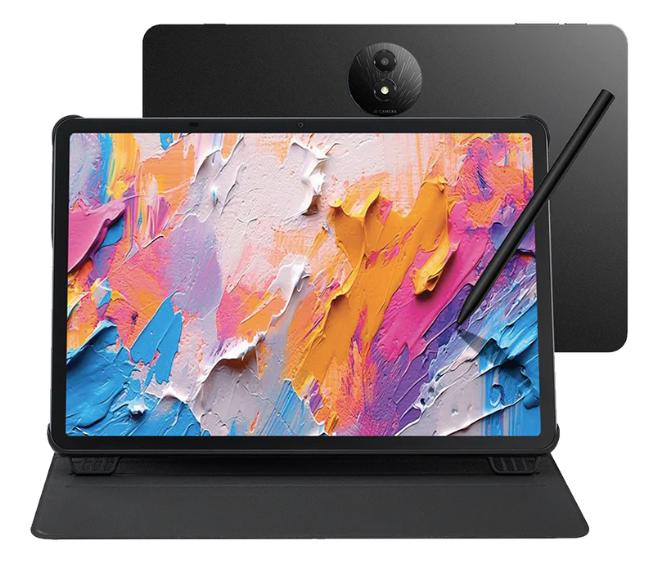
This screen texture and coating does an amazing job of reducing fingerprints, and eliminating glare. The screen really does feel like paper, which makes writing with the included stylus a legitimately viable option – something I would almost never consider on other tablets. Other screen details:
- 11.45″ diagonal
- 120Hz refresh rate
- 2200 * 1440 resolution (2.2K)
- ~550 nits screen brightness
The NXTPAPER feature gives you three screen modes (and there’s a physical button to switch, which is nice).
- Standard Mode – Your typical bright colorful mode, for streaming, or routine tablet use.
- Color Paper Mode – A toned down color palette.
- Ink Mode – This is a black & white mode meant to act like an e-ink reader.
Note: I’d like to point out that it is NOT an actual e-ink reader – with e-ink, there’s a huge power saving advantage, as power is only consumed while refreshing the page. NXTPAPER is meant to mimic the visual characteristics of an e-ink capable device, such as the reduced glare, and relatively good viewing outdoors in sunlight, but there’s no power consumption advantage.
That stylus stores magnetically to the edge of the tablet, and the included case has a small gap to accommodate it. Did I mention that the stylus is USB-C rechargeable (Hallelujah!)? It is. The case is kind of unique, having a silicone / rubbery texture, which I happen to like very much. If that’s not your jam, there are plenty of third party options.
The rest of the specs are pretty good. 16GB of RAM (8+8), and 256GB of storage. It has an 8000mWh battery, so it’ll last pretty much all day. There is no SD Card expansion slot, but with wireless connectivity having become what it is, streaming is almost always viable, so that’s less important than it used to be.
Physical Specs:
- Size: 10.26 x 6.96 x .26 inches (260.48 x 176.82 x 6.55mm)
- Weight: 17.28oz (490g)
As I mentioned, I read a lot on my tablets – at this point, far more than any other activity – so for the screen alone, this device is a big win for me. It also happens to be substantially thinner, lighter, and flatter (!) than my Lenovo Tab Plus.
I haven’t yet traveled with the NXTPAPER, but I will in a couple of months. I think it’s going to be up to the task, and as a consequence, my Tab Plus is going to be a hand-me-down to my daughter a little sooner than I’d expected.
No regrets.
 Whiskey Alpha Romeo
Leave a reply to Perfecting Travel – Whiskey Alpha Romeo Cancel reply